

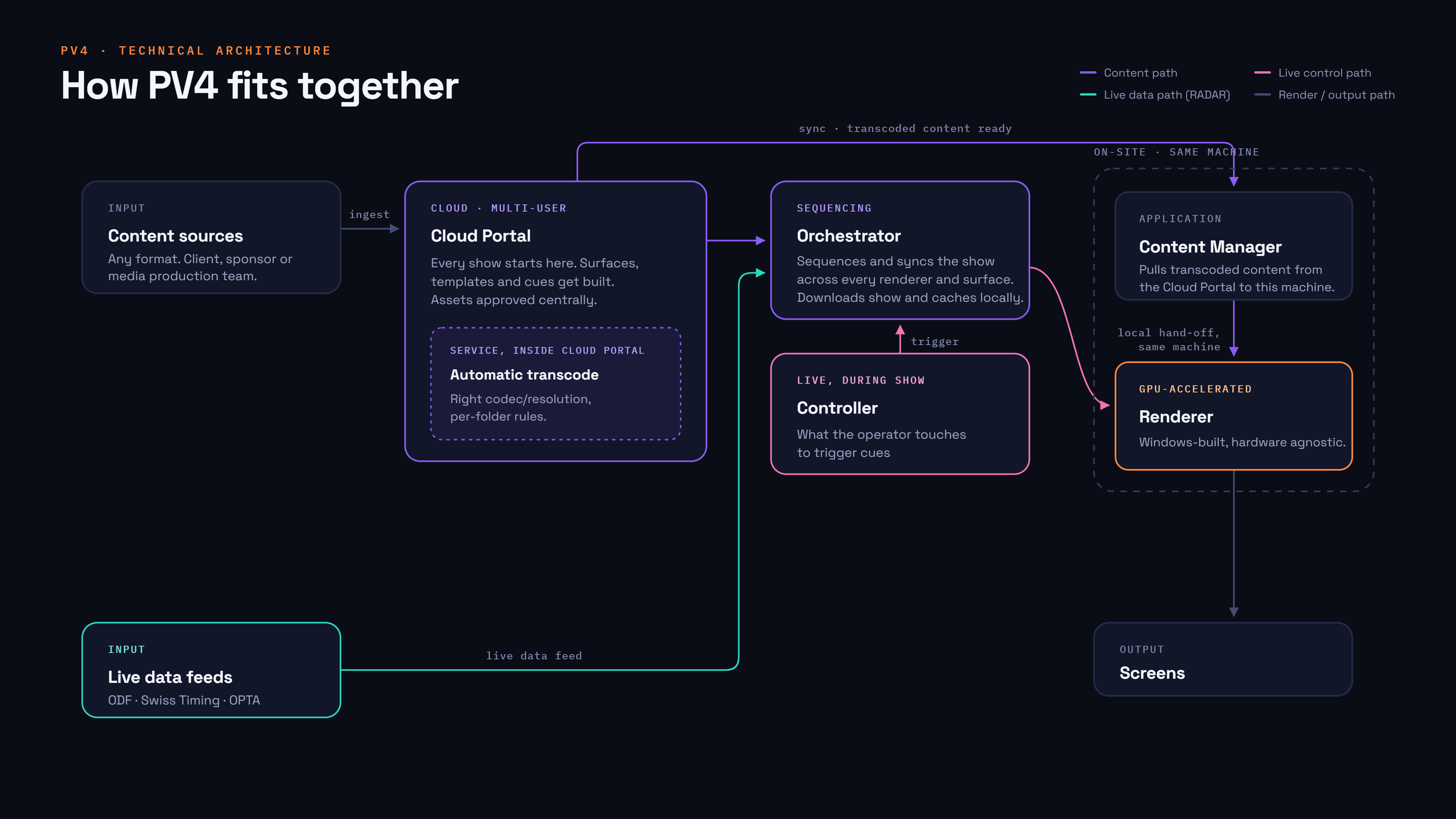
PV4's on-site applications are designed to work together as one system, not as four separate tools that happen to talk to each other. This page explains how the pieces fit, so the rest of the documentation makes sense in context.
The pieces
|
Component |
What it does |
|---|---|
|
PV4 Portal |
Where shows, cues, templates, surfaces, and your content library are configured. Runs in the cloud — this is what you log into on the web. |
|
Orchestrator |
The on-site hub. Caches show data from the PV4 Portal, coordinates every other on-site application, and is the single point all control commands pass through. |
|
Controller |
The operator's interface. Sends cue triggers to the Orchestrator and displays status back from it. Does not talk to the Renderer directly. |
|
Renderer |
Does the actual playback — video, audio, graphics — to your Surfaces. Takes its instructions from the Orchestrator and its content from the Content Manager. |
|
Content Manager |
Keeps a local copy of your show's content library in sync with the PV4 Portal, so the Renderer always has up-to-date assets on disk. |
How they connect
Why this matters
-
Only one machine on your network should run the Orchestrator — it's the single source of truth for the show, and running two creates conflicting information.
-
If the Controller looks wrong or unresponsive, the problem is usually between the Controller and the Orchestrator, not the Renderer — the Controller never talks to the Renderer directly.
-
If content isn't showing up, check the Content Manager first — the Renderer plays whatever the Content Manager has already synced locally, not whatever is currently in the Portal.
-
The Orchestrator needs internet access to receive updates from the PV4 Portal, but the rest of the on-site system (Controller, Renderer) can keep running locally through the Orchestrator if that connection drops.
Where to go next
-
New to PV4? Start with Getting Started.
-
Setting up hardware and networking? See Requirements.
-
Installing a specific application? See its guides under Orchestrator, Renderer, Controller, or Content Manager.